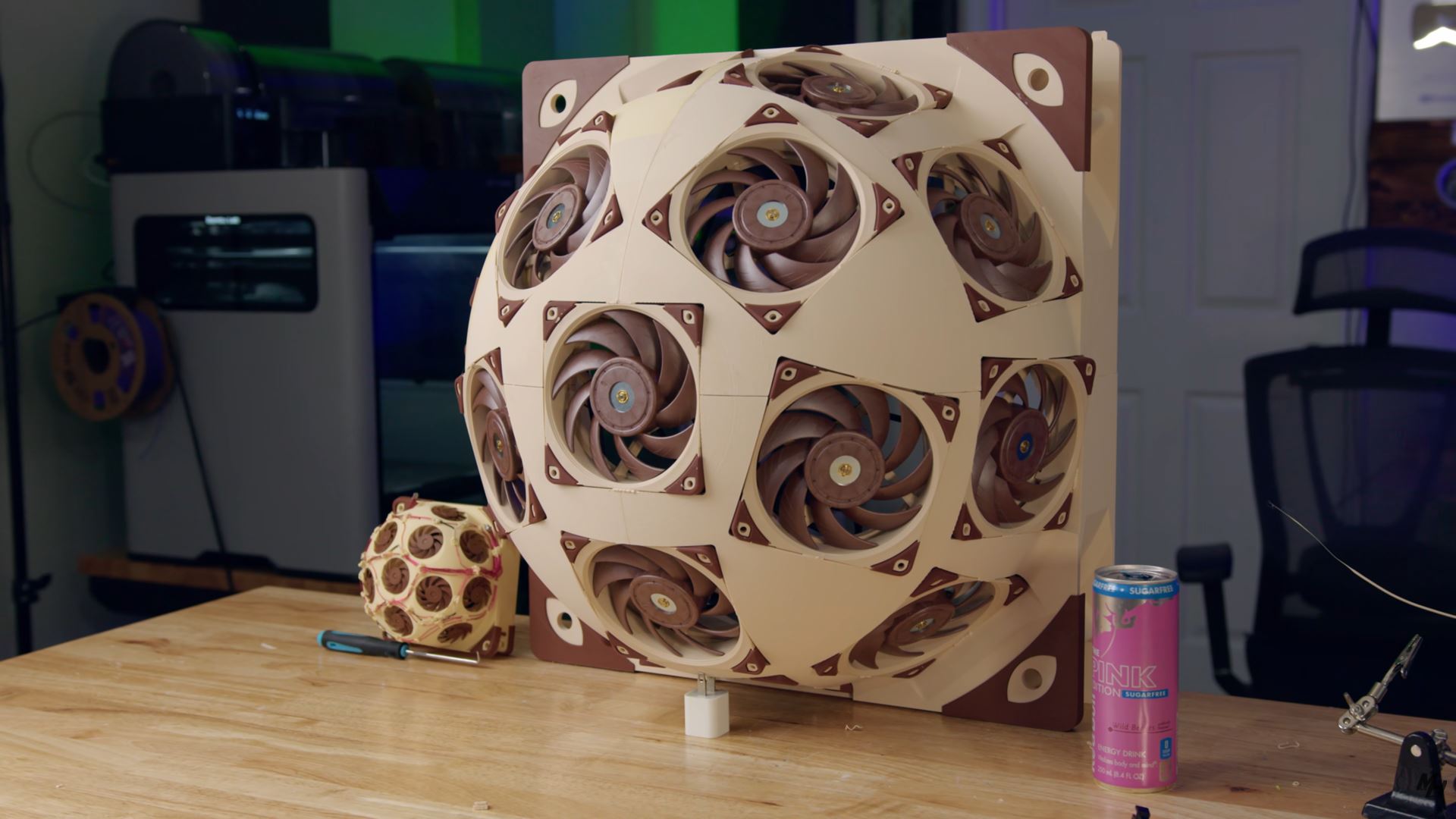
Picture this: PC builders everywhere chasing that elusive cool run, pouring cash into AIOs, custom loops, even exotic phase-change rigs. Liquid cooling was king—quiet, efficient, the undisputed champ. But here’s Major Hardware, YouTuber with a knack for the absurd, flipping the script with his Noctua SuperDome—a 3D-printed fortress crammed with 15 Noctua NF-A12 fans. Temps plummet 20°C on a Ryzen 9 5950X already rocking a custom liquid loop.
This isn’t some fringe hack. It’s a thunderclap reminder that air cooling, done right, can still embarrass the fancy stuff.
What the Hell is the Noctua SuperDome?
So, Major Hardware didn’t just slap fans on a case. No—he engineered a dome. Think geodesic, like Buckminster Fuller’s fever dream, but for airflow. Noctua hooked him up with 15 of their NF-A12s (best-in-class for silence and shove), and he 3D-printed the scaffold to mount ‘em all.
Rig’s no slouch: AMD Ryzen 9 5950X, custom liquid loop that’d make most builders weep with envy. Stock side panel? CPU hits 86-87°C under gaming load, per Ryzen Master. Swap in the SuperDome? Boom—66-67°C. That’s a 20°C drop. Crazy? Wait.
Power draw? Under 30W in silent or normal mode. Noise? Barely a whisper. He skipped high-RPM mode ‘cause why bother when you’re already winning.
“The temperature for the AMD Ryzen 9 5950X remained around 86-87°C as per Ryzen Master’s reading. After replacing the side panel with the Superdome, he tested again with a couple of games and saw a dramatic drop in the CPU temperatures… just 66-67°C, which is a 20°C drop in temperature.”
Major Hardware’s words—straight fire. This ain’t hype; it’s data.
And look, my hot take: this echoes the 1990s fan farms on Pentium IIs. Back then, enthusiasts duct-taped box fans to cases ‘cause Intel chips melted like butter. We laughed—then iterated. SuperDome’s that spirit reborn, but surgical. Not a sloppy hack; precision engineering. Predict this: we’ll see commercial “dome panels” from Lian Li or Fractal by 2026. Mark it.
Why Wasn’t Anyone Doing This Before?
Simple. Laziness. Or smarts? Custom loops seduce with that sleek glow, the whir of pumps like a sports car. But they’re finicky—leaks, maintenance, cost. Air cooling? Plug and play. Yet nobody scaled fans like this. Why?
Physics, mostly. Airflow’s a beast—turbulence, dead zones, diminishing returns past 3-4 fans. Major Hardware sidestepped it with dome geometry, channeling 15 streams into a vortex over the motherboard. It’s like herding cats into a laser-focused gale.
Noctua’s fans shine here: 60mm blades optimized for static pressure, low noise. Total static pressure? Off the charts. And that 3D print—custom, precise. Replicate at home? Tricky without engineering chops.
But damn, the wonder. Imagine overclocking that 5950X to oblivion now. No thermal throttling. Sustained boosts. It’s AI training rigs next—servers choking on heat, screaming for this.
One paragraph wonder: Scalable insanity.
Here’s the thing—liquid cooling’s plateaued. Pumps cap out, radiators bloat cases. Air? Infinite scalability. Stack domes. 30 fans. 50? Power bill spikes, sure, but in a data center? Game over for AIOs.
Skeptical? Me too, at first. But video’s timestamped, tools legit. Ryzen Master’s no liar. This shifts paradigms—like when SSDs nuked HDDs. Air cooling’s roaring back, dome-shaped.
Can You Build Your Own Noctua SuperDome?
Short answer: probably not easily. Need 15 NF-A12x25s (~$25 each, $375 total), 3D printer for the dome (STL files likely on YouTube soon), custom fan controller for sync. Case mod: ditch side panel, mount securely.
Risks? Vibration havoc if unbalanced. Dust magnet. Aesthetics? Industrial chic, if you’re into that. But temps? Worth it for enthusiasts pushing 16-core beasts.
Bold prediction: Noctua quietly greenlights this. Their PR’s too buttoned-up for official endorsement, but samples sent? Wink. Expect “SuperDome Kit” rumors by summer.
Noise stays low—key for deskside warriors. High mode untouched, yet still 20°C win. Imagine pairing with next-gen AM5 chips, 170W TDP monsters.
This DIY sparks joy. Reminds us: tech’s playground, not museum. Tinkerers rule.
Why Does the SuperDome Matter for PC Builders?
Forget marginal gains. 20°C is massive—unlocks headroom for undervolts, overclocks, silence. Your 13900K gasping at 95°C? Dome it.
Broader? Challenges AIO monopoly. Corsair, NZXT—watch your backs. Air’s cheaper, reliable, no corrosion. In hot climates? Lifesaver.
Energy sip—30W vs. loop’s 50-100W pumps. Green cred.
Wander a sec: evokes wind tunnels, F1 diffusers. Flow dynamics, baby. PC building’s turning aerodynamic.
🧬 Related Insights
- Read more: Intel’s Record-Thin GaN Chiplet: Smart Foundry Bet or Desperate AI Catch-Up?
- Read more: Supermicro’s Gold Series: 3-Day Servers or Supply Chain Smoke Screen?
Frequently Asked Questions
How much does a Noctua SuperDome cost to build?
Around $400-500: 15 fans at $25 each, plus 3D filament, controller, mods. Cheaper than high-end custom loop.
Will the SuperDome work on my gaming PC?
Yes, if you’ve got side panel space and a hot CPU. Best for air-cooled or AIO upgrades; custom loops see biggest wow factor.
Is the Noctua SuperDome louder than stock cooling?
Nope—under 30W modes stay whisper-quiet, even with 15 fans. High mode untested but would ramp up.